
Hypic - Photo Editor & AI Art
Bytedance Pte. Ltd.Photography
3.01.53K Reviews
- Version
- 10.0.0
- Installs
- 100.00M
- Age Rating
- Everyone
Screenshots
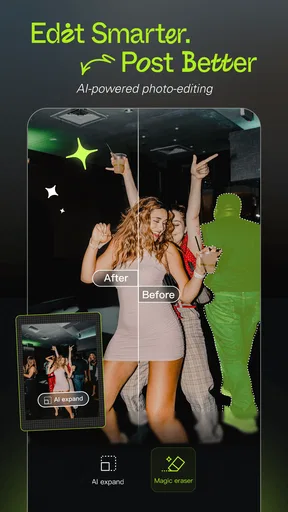
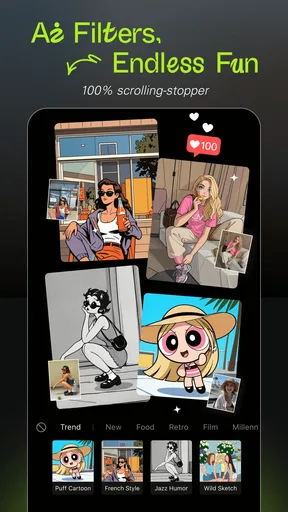
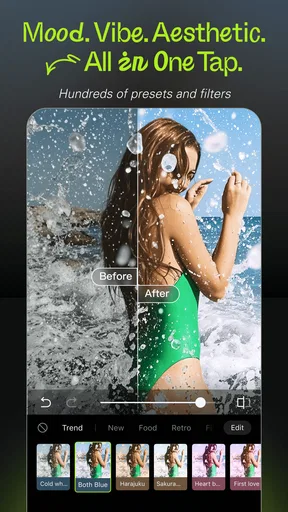
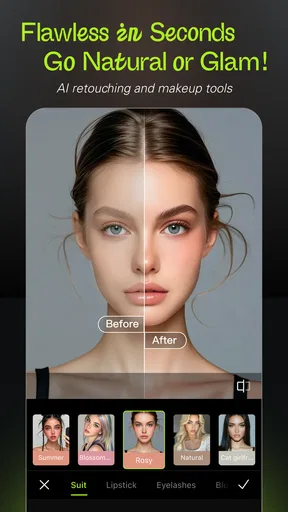
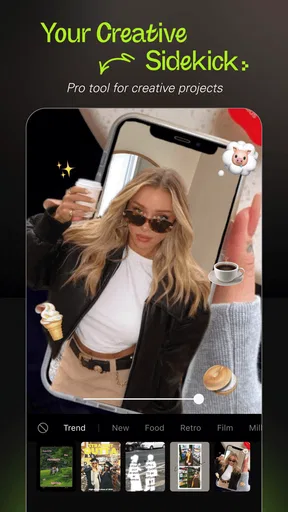
Our Review of Hypic - Photo Editor & AI Art
 Analysis by Appyee
I reach for a photo editor when a picture is almost right but needs a little help: a softer look, more lively color, or a creative treatment that makes it feel different from the original. Hypic - Photo Editor & AI Art is aimed at that kind of quick, visual makeover. It combines familiar photo adjustments with AI effects, so it can suit someone who wants to experiment without turning every edit into a technical project.
What the free starting point means
Hypic is a free photography app from Bytedance Pte. Ltd., with in-app purchases listed from $2.99 to $159.99 per item. That makes it possible to begin without paying, but it would be a mistake to assume every tool or effect is included at no cost. I’d explore the free editing experience first and only consider a purchase if a particular paid item clearly fits the way I use the app.
The app is rated for Everyone and has a 4.0 average from around 226,000 ratings, with about 1,300 written reviews. It has over 50 million installs, which suggests that it has reached a broad audience, though popularity alone doesn’t tell me whether its editing style will suit you. It was released on January 3, 2023, and version 8.2.0 requires Android 6.0 or later.
Where the value shows up in everyday editing
The practical appeal is having conventional adjustments and more expressive AI effects in one place. If I’m preparing a photo for a profile, a message, or a social post, I can start with basic improvements and then decide whether a filter or a more imaginative treatment actually helps. That flexibility is useful when I want a finished image quickly rather than a long session in a desktop editor.
AI-style transformations are best treated as creative options, not automatic upgrades. A dramatic effect can make a landscape feel fresh, but it may also pull attention away from the scene or change the mood more than I intended. I’d compare the edited result with the original before saving or sharing, especially for travel pictures where the real colors and details matter.
Trade-offs to keep in mind
A quick, approachable workflow is not the same as full control over every part of an image. If you need a carefully repeatable professional process, precise layer work, or a dependable finish across a large client project, a more specialized editor may be a better fit. Hypic makes more sense for personal pictures and playful experimentation than for work that depends on exact, consistent output.
There’s also a cost decision to make if a feature you like sits behind an in-app purchase. The listed range is broad, so I wouldn’t judge value from the lowest amount alone or buy on impulse after seeing a striking effect. First check what you can do without paying, then weigh any purchase against how often you expect to use that specific option.
In the photography category, the usual alternatives tend to divide between simple editors built around quick corrections and more involved tools that reward careful, manual work. Hypic’s draw is the middle ground: conventional edits alongside AI-led visual changes. That makes it a useful choice if you want to try several looks, but less compelling if you only need a straightforward crop and exposure correction or prefer to make every adjustment yourself.
Who is most likely to enjoy it
I’d recommend trying Hypic if you regularly edit selfies, travel snapshots, or casual pictures before sharing them, and you enjoy seeing how different effects change the mood. It is also a reasonable place for a beginner to explore visual edits without first learning a complex professional workflow. If you mainly archive photos, need strict color accuracy, or dislike AI-generated looks, you may get more value from a simpler or more manual editor.
A useful everyday approach is to keep the original image as your reference, make a restrained correction first, and only then test a stronger effect. That order helps me tell whether an AI treatment is improving the picture or simply making it more dramatic. For a family gathering, for example, I might brighten a dim group photo for sharing but avoid a stylized transformation that makes familiar faces or colors feel unlike the moment.
Before choosing it as your regular editor, consider what you need after editing too. If your main goal is a fast image to send or post, a direct workflow matters more than an extensive collection of controls. If you need consistent edits across a carefully organized collection, check whether the app’s actual workflow matches that habit before relying on it. The best fit depends less on the number of effects than on whether you like the results and can reach them without friction.
My overall advice is to start with the no-cost experience and treat paid items as optional rather than necessary. Hypic offers an appealing blend of everyday adjustments and creative AI effects, but it won’t be everyone’s ideal tool. I’d skip it if you want a strictly manual editor or need dependable professional precision; for casual photography and playful edits, it is worth trying.
First Impressions: Getting Started with Hypic
When I first downloaded Hypic - Photo Editor & AI Art, I was immediately struck by its sleek and user-friendly interface. It's not cluttered or overwhelming, which is a huge plus if you're like me and prefer things to be straightforward. The app is available on both Android and iOS, so no worries about compatibility here!
The installation was a breeze, and getting started took no time at all. Once inside, you're greeted with a variety of editing tools that are both powerful and easy to navigate. If you're someone who loves taking photos and wants them to pop, you're in for a treat.
Features That Stand Out
One of the coolest features I found was the AI art generator. It's like having a digital artist at your disposal! You can transform your photos into stunning pieces of art with just a few taps. The AI uses advanced algorithms to apply artistic styles that make your photos look like they belong in a gallery.
But that's not all. Hypic offers a comprehensive set of editing tools that let you adjust everything from brightness and contrast to color saturation and sharpness. You can even add filters and effects to give your photos that extra oomph.
And if you're into selfies, the app's beauty tools are top-notch. From smoothing skin to whitening teeth, you can make all the tweaks you need to feel confident about your snaps. It's like having a makeup artist on call!
Using Hypic: A Personal Touch
I decided to put the app to the test with some of my recent travel photos. Applying the AI art feature, I was amazed at how effortlessly my landscape shots were transformed into vibrant, dreamy artworks. It's not just a filter; it's a whole new dimension of creativity.
The editing tools are intuitive, allowing for precise adjustments. The sliders are responsive, and I never felt like I was lost or unsure about what to do next. The app provides helpful tips and suggestions, which is great for beginners or anyone looking to improve their editing skills.
One thing I particularly appreciated was the batch editing option. If you're like me and have a ton of photos to go through, this feature saves you a ton of time. You can apply edits to multiple photos at once, which is a game-changer for those photo-heavy events.
Community and Sharing
Hypic isn't just about editing; it's about sharing too. The app makes it super easy to share your creations on social media platforms. Whether it's Instagram, Facebook, or Twitter, you can export your edited photos in high resolution, making sure they look fabulous wherever you post them.
There’s also a vibrant community within the app where you can showcase your work and get inspired by others. It's a great way to see what others are creating and maybe pick up a few new techniques along the way.
Final Thoughts: Is Hypic Worth It?
After spending some quality time with Hypic - Photo Editor & AI Art, I can confidently say it's a fantastic tool for anyone looking to enhance their photos. Whether you're a casual snapper or a hardcore photo enthusiast, the app offers something for everyone.
The combination of intuitive editing tools, the innovative AI art feature, and the ease of sharing makes it a standout choice in a crowded market. Plus, it's just plain fun to use! So if you're looking to add a creative touch to your photos, give Hypic a try. You might just find yourself getting hooked on the endless possibilities it offers.
Ready to transform your photos? You can download Hypic on the Google Play Store or the Apple App Store and start your creative journey today!
Privacy and Permissions
See what permissions an app requests and how it handles your data.
- Photos/Media/Files
- read the contents of your USB storage, modify or delete the contents of your USB storage
- Storage
- read the contents of your USB storage, modify or delete the contents of your USB storage
- Camera
- take pictures and videos
- Microphone
- record audio
- Wi-Fi connection information
- view Wi-Fi connections
- Other
- view network connections, pair with Bluetooth devices, change network connectivity, full network access, run at startup, draw over other apps, use accounts on the device, control vibration, prevent device from sleeping, toggle sync on and off, install shortcuts, uninstall shortcuts
Verdict
Strengths of Hypic - Photo Editor & AI Art
- Intuitive and user-friendly interface.
- Powerful AI art generation features.
- Wide range of photo editing tools.
- Regular updates with new content.
- Supports high-resolution exports.
Limitations of Hypic - Photo Editor & AI Art
- Some features require in-app purchases.
- Occasional ads can be intrusive.
- Limited free preset options.
- Requires stable internet for AI tools.
- High battery consumption during use.
Other Releases by Bytedance Pte. Ltd.
View All
CapCut - Video Editor
Video Players & Editors3.5

CapCut Pad
Video Players & Editors3.4
Similar Picks in This Category
View All
Google Photos
Google LLC4.4

Gallery
Google LLC4.2

Picsart AI Photo Editor, Video
PicsArt, Inc.3.9

B612 AI Photo&Video Editor
SNOW Corporation4.1

BeautyPlus-Selfie Photo Editor
PIXOCIAL TECHNOLOGY (SINGAPORE) PTE. LTD.4.5

Remini - AI Photo Enhancer
Bending Spoons4.1
Frequently Asked Questions
What are the main features of Hypic - Photo Editor & AI Art?
Hypic offers a wide range of photo editing tools including filters, retouching options, and AI-driven enhancements. The app allows users to transform images into artworks using AI technology. It also includes features for adjusting brightness, contrast, and saturation, as well as tools for cropping and adding text.
Is Hypic - Photo Editor & AI Art free to use?
Hypic is free to download and offers a variety of features at no cost. However, there are premium options available that unlock additional tools and filters. These can be accessed through in-app purchases or a subscription model, offering an enhanced experience for users who want more advanced editing capabilities.
How user-friendly is the Hypic app for beginners?
Hypic is designed with a user-friendly interface, making it accessible for beginners. The app includes tutorials and guides to help new users navigate its features. Its intuitive layout ensures that even those with minimal photo editing experience can easily enhance their images and create stunning AI art.
Does Hypic - Photo Editor & AI Art require an internet connection?
While many of Hypic’s basic editing features can be used offline, some AI-driven functionalities and updates require an internet connection. Accessing premium content and syncing across devices also necessitates being online, ensuring users have the latest tools and filters at their disposal.
What devices are compatible with Hypic - Photo Editor & AI Art?
Hypic is compatible with both Android and iOS devices. It supports a wide range of smartphones and tablets, ensuring that users can enjoy its features regardless of their device. It is recommended to use the app on devices with the latest operating systems for optimal performance.
